August 31, 201213 yr completely disregard my old thread, for it is dead and i have new information. I thought the guy in Idaho might still have my car, so i was trying to find him. i finally fronted the money and did a car fax to find out she's in Colfax WA, only 129 miles from me. Anyone from that area, can you please please please help me find my old subaru. here's some helpful info: JF2AN55B1JG419272 lic# 079NMZ she's grey, power everything, a little rust and damage on the liftgate. pics are in my old thread. like i just posted on the old one: " I actually had no clue it was possible to get this attached to a car, but at the time being, i am serious when i say i would be willing to give ANYTHING to have this car back; i'd be willing to give a damn organ for ************ sakes."
August 31, 201213 yr that's a 2 hour drive how come you're not already there? Oh, it might be construed as stalking. good luck
August 31, 201213 yr Author i'm so desperate to find her, i actually put out a craigslist add in that area. http://pullman.craigslist.org/wan/3241975247.html
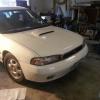
September 4, 201213 yr Author HOLY ************ YOU GUYS! I actually found my subaru. After searching on Carfax then putting out a searching add on CL, the guy contacted me at 6:30 this morning cause someone up there put a note on the car with my number saying i'm looking for my car. the guy actually said he was kinda freaked out when he found the note xD he thought i drove all the way up to leave the note. Well, i think i'm just gonna try to schedule a visitation in the future, seeing as i cannot afford 1300 to buy her back right now. Edited September 4, 201213 yr by soobie_newbie67

Please sign in to comment
You will be able to leave a comment after signing in
Sign In Now