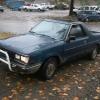
August 22, 200520 yr Hey, Someone claimed my brat doors when they were sitting at austin's before I had a chance to pull the lower body plate and trim off of them, Who ever has them? I was hoping I could get the trim pieces and the lower body "armor" off of them. I would like to keep that orginal on my brat when I get the body repaired and painted. Thanks to who ever has em. I hope they didn't get to far yet. P.S. It was a suprise to me that they were gone when I went to pick them up. Austin mastakenly let someone have them is my understanding, it's really no big deal if I can't get the parts back though, just means the brat won't be orginal when I'm done.
August 22, 200520 yr If they were the ones that were in the front, the roofers were going to throw them into a dumpster. I was supposed to come up and grab everything but haven't done it yet; Austin's Mom was suppposed to have saved the doors and bumpers from an ignominious fate.
August 22, 200520 yr Author yeah, Austin told me someone picked up a bunch of doors, he didn't realise my brat doors were the ones they picked up. One of the wagon doors was still sitting there though... His mom thought they were mine. I was like uhhh, no mine are aparently gone now... hmmm. So someone picked up a bunch of doors, and mine were a pair of them. :-\ I went over there just before the roofers came.

Please sign in to comment
You will be able to leave a comment after signing in
Sign In Now